
FireBrick L2TP Server: Difference between revisions

Fix syntax |
→FireBrick Config: consistent trailing full stop in lists |
||
| (One intermediate revision by the same user not shown) | |||
| Line 27: | Line 27: | ||
The settings explained are: |
The settings explained are: |
||
*name - Just a name for this |
*name - Just a name for this |
||
*hostname - the hostname used within the [[L2TP|l2tp]], this will be used later when setting up the AAISP SIM end |
*hostname - the hostname used within the [[L2TP|l2tp]], this will be used later when setting up the AAISP SIM end |
||
*secret - the password (optional) |
*secret - the password (optional) |
||
*pppip - the IP used as the PPP endpoint on the FireBrick - typically the FireBricks IP address |
*pppip - the IP used as the PPP endpoint on the FireBrick - typically the FireBricks IP address |
||
| Line 35: | Line 35: | ||
The match settings are to match individual SIMs when the connect in, and thus giving them their own IP address etc. You can add multiple Match entries; one for each SIM you have. |
The match settings are to match individual SIMs when the connect in, and thus giving them their own IP address etc. You can add multiple Match entries; one for each SIM you have. |
||
*name - just a name, e.g. the name of the person using this SIM |
*name - just a name, e.g. the name of the person using this SIM |
||
*graph - make a graph for this SIM - will show usage etc., but latency can be ignored |
*graph - make a graph for this SIM - will show usage etc., but latency can be ignored |
||
*calling-station-id - this is the ICCID of the SIM, as AAISP use this as the station id |
*calling-station-id - this is the ICCID of the SIM, as AAISP use this as the station id |
||
*remote-ip - the IP address to give the SIM, i.e., an IP address on your LAN |
*remote-ip - the IP address to give the SIM, i.e., an IP address on your LAN |
||
| Line 48: | Line 48: | ||
==Routing from the LAN (Enable proxy-ARP)== |
==Routing from the LAN (Enable proxy-ARP)== |
||
If you are assigning IPs from your LAN to the SIM, then as the [[L2TP]] connection is on a different interface to your LAN -to enable routing from the LAN to your SIM you will need to set proxy-arp=true on the LAN interface. |
If you are assigning IPs from your LAN to the SIM, then as the [[L2TP]] connection is on a different interface to your LAN -to enable routing from the LAN to your SIM you will need to set <tt>proxy-arp=true</tt> on the LAN interface. |
||
=AAISP Config= |
=AAISP Config= |
||
Latest revision as of 13:35, 4 July 2024
Overview
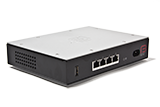
A FireBrick can be easily configured to act as an LNS (L2TP Network Server) - you can then terminate direct L2TP connections on it from remove devices, or relay data SIMs or DSL circuits on to it (where the ISP support s L2TP relay - we do on the A&A Data SIMs and DSL services) This means, you can have remote 3G/4G LTE Mobile Data SIMs or DSL circuits terminated directly on to your LAN or a VLAN on your internal network.
This is ideal for remote monitoring, digital signage, machine-to-machine networking, IoT etc... As the remote device is being terminated on the FireBrick, you have full control over firewall and internet access to and from the remote device.
- A 'Fully Loaded' FireBrick is required for L2TP features
- AAISP Data SIMS can be relayed on to your own L2TP Server, such as a FireBrick. This will enable a remote SIM to be connected directly to your LAN and have an IP on your LAN, very similar to a VPN.
- The Computer (or device) with the SIM will not need any special config or software installed.
- The L2TP is not encrypted, but you could run IPsec over the top.
- Basic setups can be done in the FireBrick config without the need to run your own RADIUS server - for each SIM connecting in you'll need a single <match .../> config.
- The FireBrick allocates IPs statically within the config and can't use DHCP - for more advanced and more flexible configurations you'd run your own RADIUS server.

FireBrick Config
On the WebUI, this is set under Tunnels, L2TP, Incoming L2TP connections, and basic XML example is as below:
- Screenshots
-
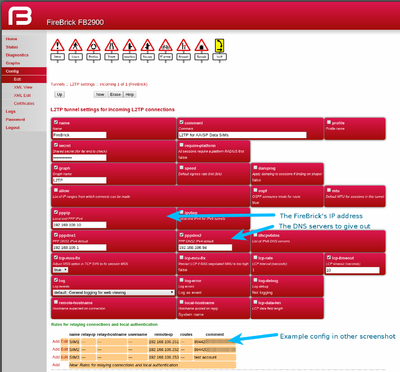 L2TP settings
 -
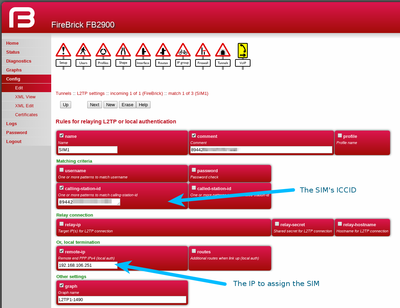 Match settings


The settings explained are:
- name - Just a name for this
- hostname - the hostname used within the l2tp, this will be used later when setting up the AAISP SIM end
- secret - the password (optional)
- pppip - the IP used as the PPP endpoint on the FireBrick - typically the FireBricks IP address
- pppdns1/2 - DNS servers that the FireBrick will give out
- lpc-rate/timeout - used for graphs - we don't need to poll as often as the actual LCPs are not answered by the SIM, but by the mobile network. Basically latency on the graphs for SIMs should be ignored.
The match settings are to match individual SIMs when the connect in, and thus giving them their own IP address etc. You can add multiple Match entries; one for each SIM you have.
- name - just a name, e.g. the name of the person using this SIM
- graph - make a graph for this SIM - will show usage etc., but latency can be ignored
- calling-station-id - this is the ICCID of the SIM, as AAISP use this as the station id
- remote-ip - the IP address to give the SIM, i.e., an IP address on your LAN
Firewall
You will also need firewall filters, e.g. to allow traffic out of the SIM, in a rule-set add something to match the SIM.
<rule name="L2TPOut" source-interface="l2tp"/>
This of course can be restricted, so you could give a SIM just access to your LAN and not your WAN - i.e. to block internet access whilst allowing them to access your own internal servers.
Routing from the LAN (Enable proxy-ARP)
If you are assigning IPs from your LAN to the SIM, then as the L2TP connection is on a different interface to your LAN -to enable routing from the LAN to your SIM you will need to set proxy-arp=true on the LAN interface.
AAISP Config

At the AAISP end, AAISP will set up a 'line' on the control pages for your SIM, you can request Staff to set this for L2TP:
- Target IP - IP (4 or 6) of your FireBrick
- Host - The Hostname as set in your 'incoming' config, i.e. FireBrick in this case
- secret - The secret as set in your incoming config, i.e. myPassword in this case
Diagnostics
On the Web interface, Status, L2TP will give the connection, if it's connected.

You can use the FireWall check to check if a SIM will have access to the internet.
You can also check the routing of the IP you've assigned the SIM.
Separate (NAT) Subnet for the Dongle
Rather than giving your SIM an IP on your LAN, you could give the SIM a private (RFC1918) IP in the <match config, e.g.:
<match name="SIM" graph="SIM" calling-station-id="8944200000000000" remote-ip="192.168.99.99" comment="My SIM"/>
Here there is no need to create a separate subnet interface on the FireBrick. This SIM then be accessible from your LAN and not your WAN, and the SIM will only have access to your LAN and not the WAN.
To give the SIMs access to the Internet, you will need a Route Override configured to NAT the traffic from the L2TP to your internet interface (in this case PPPoE), eg:
 <route-override name="L2TP NAT">
   <rule name="NAT the SIM for Internet Access" source-interface="[[L2TP|l2tp]]" target-interface="pppoe" set-nat="true"/>
 </route-override>