
Ethernet Port Settings: Difference between revisions

m →1Gb/s |
|||
| (35 intermediate revisions by the same user not shown) | |||
| Line 1: | Line 1: | ||
<indicator name="Front">[[File:Menu-ethernet.svg|link=:Category:Ethernet|30px|Back up to the Ethernet Services Page]]</indicator> |
|||
This information is in relation to our Etherway/Etherflow services. |
This information is in relation to our Etherway/Etherflow and EAD services, their physical port settings and VLAN information. |
||
==Link speed== |
|||
| ⚫ | |||
| ⚫ | |||
==100Mb/s== |
|||
| ⚫ | |||
=Physical Connections= |
|||
| ⚫ | IMPORTANT the |
||
==1Gb/s Services (Standard) == |
|||
'''Main point:''' |
|||
| ⚫ | |||
* Customer router connects to Openreach supplied ONT via Fibre patch lead, not copper RJ45. |
|||
===SFP Requirements for customer router=== |
|||
==1Gb/s== |
|||
*For 1Gbit/s bearers, the connection from the Openreach NTE to the customer equipment is presented using multimode mode fibre on LC connectors. |
|||
| ⚫ | |||
*Your router/switch would also need a SFP port. |
|||
[[File:SFP-SX.jpg|thumb|SX SFP]] |
|||
*A suitable SFP for the customer equipment would be a 550m MMF 850nm SX SFP and a length of multimode cable with LC connectors at each end. |
|||
*We can supply a suitable SFP and cable if you require. |
|||
| ⚫ | |||
For 1Gbit/s bearers, the connection from the Openreach to the customer equipment is presented using multimode mode fibre on LC connectors. A suitable SFP for the customer equipment would be a 550m MMF 850nm SX SFP and a length of multimode cable with LC connectors at each end. your router/switch would also need a SFP port. We can supply a suitable SFP and cable if you require. |
|||
<gallery widths=250 caption="Some photos of the NTE, SFP, cables etc"> |
|||
| ⚫ | |||
Etherway-ONT.JPG|Openreach NTE for 1G circuits |
|||
SFP-SX.jpg|SX SFP for customer equipment |
|||
MMF.jpg|Multimode patch lead |
|||
Adva-closeup.png|Close up |
|||
Adva-patch-router.png|Patching in router using Singlemode |
|||
</gallery> |
|||
===Can't use the RJ45 port...=== |
|||
| ⚫ | In most cases, it is possible to replace the Openreach supplied SFP with something different, eg a DAC cable, this may light an error LED on the Openreach box though, and so cause confusion in the event of a fault. |
||
*The Openreach NTE does have a copper RJ45 port as well as an SFP port for connection to the customer router - however, '''the copper port is disabled by Openreach and the fibre port should be used.''' |
|||
*If customer router only has RJ45 copper ports, then a little media convert would be required. These are available for under £20 - eg a TP-Link MC220L. |
|||
===DAC cable?=== |
|||
The ONT requires power, and has two IEC sockets for resilience. eg, you can use a UPS on the 2nd power socket to power the unit in the event of mains power loss. |
|||
| ⚫ | |||
*We'd also require that the Openreach supplied SFP is used in the event of a fault report. |
|||
*We'd suggest just using multimopde fibre! |
|||
== |
===Power=== |
||
*The ONT requires power, and has two IEC sockets for resilience. |
|||
| ⚫ | |||
*We suggest using normal mains power on the first socket and a UPS on the 2nd power socket. |
|||
==100Mb/s Services (No longer offered) == |
|||
| ⚫ | |||
| ⚫ | |||
| ⚫ | |||
| ⚫ | IMPORTANT the port on the Openreach supplied unit is sometimes configured as fixed full duplex. This means that if it is connected to an un-managed switch or un-configured port on a switch, router or firewall then it will not work correctly. It will seem to work, but as soon as any reasonable level of traffic flows there will be dropped packets seriously hindering upload speeds. You must have a managed switch or port connected to the link and configure the port to be fixed full duplex 100Mbit/s for it to work correctly. We can supply a small managed switch for this purpose if you require. |
||
Where there is more than one service on the link then all of the services will have a VLAN tag. This is used to differentiate between the services. In this case site-to-site access can use Q-in-Q double tagging to pass VLAN tags to the other site. The internet access does not have any secondary VLAN tagging that would apply. |
|||
| ⚫ | |||
Where there is only one service on the link then this can be set to operate with no VLAN tag. |
|||
===10Gb/s Services=== |
|||
| ⚫ | |||
| ⚫ | |||
| ⚫ | |||
Note that if you have VLAN tagging on any link then all links on that connection will have a VLAN tag (you can't have one un-tagged). The VLAN tag could be any of the valid tag values so check your switch does not have a limited on VLAN tag values. |
|||
At the customer side the service is presented on a VLAN. The VLAN ID will be discussed during the order process. This would then be set on your router as the VLAN on interface that is connected to the Openreach NTE. |
|||
| ⚫ | |||
| ⚫ | |||
| ⚫ | |||
| ⚫ | |||
Packet sizes up to 1548 are permitted on site-to-site traffic. Internet access is limited to 1500 bytes (plus VLAN tag where needed). |
Packet sizes up to 1548 are permitted on site-to-site traffic. Internet access is limited to 1500 bytes (plus VLAN tag where needed). |
||
=Technical details= |
|||
See [https://www.btwholesale.com/pages/downloads/Products/Integrated_Data_and_Connectivity/SIN_476v1p3.pdf BT SIN 476] for technical details. |
See [https://www.btwholesale.com/pages/downloads/Products/Integrated_Data_and_Connectivity/SIN_476v1p3.pdf BT SIN 476] for technical details. |
||
=LED Status= |
|||
===PSU LEDs=== |
|||
There are two power supplies, PSU1 and PSU2 |
|||
*Off - No power - check cabling, power, etc |
|||
*Red - PSU Failure - contact us |
|||
*Green - PSU OK |
|||
===Network=== |
|||
This is the LED next to the socket for the lead-in fibre - the cable coming in from outside: |
|||
* Red - fault, or not connected |
|||
* Green - OK |
|||
===Access=== |
|||
This is the LED next to the socket for your router |
|||
* Red - fault, or not connected |
|||
* Green - OK |
|||
==For FSP150CP Units:== |
|||
| ⚫ | |||
=== Critical=== |
|||
* off: normal, no alarms |
|||
* red: Indicative of a problem between the ADVA unit and the on site router (Check router has power and the cables connecting the two have not been disconnected, try rebooting, if problem persists |
|||
===Major=== |
|||
* off: normal, no alarms |
|||
* on: Indicative of a problem with the access carrier, normally means the unit is not connected to the local exchange (Power cycle ADVA unit and carefully re-seat fibre into ADVA, if problem persists contact us |
|||
===Minor=== |
|||
* off: normal, no alarms |
|||
* on: Minor problem exists, contact us. |
|||
[[Category:Ethernet]] |
[[Category:Ethernet]] |
||
Latest revision as of 07:36, 26 June 2025
This information is in relation to our Etherway/Etherflow and EAD services, their physical port settings and VLAN information.
The Ethernet services are presented in different ways depending on the link speed you have requested, though the most common is 1Gb/s.
Physical Connections
1Gb/s Services (Standard)
Main point:
- Customer router connects to Openreach supplied ONT via Fibre patch lead, not copper RJ45.
SFP Requirements for customer router
- For 1Gbit/s bearers, the connection from the Openreach NTE to the customer equipment is presented using multimode mode fibre on LC connectors.
- Your router/switch would also need a SFP port.
- A suitable SFP for the customer equipment would be a 550m MMF 850nm SX SFP and a length of multimode cable with LC connectors at each end.
- We can supply a suitable SFP and cable if you require.
This link should be used with an auto-negotiation, which is the default for gigabit links.
- Some photos of the NTE, SFP, cables etc
-
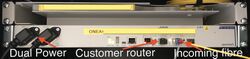 Openreach NTE for 1G circuits
 -
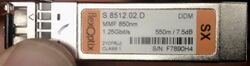 SX SFP for customer equipment
 -
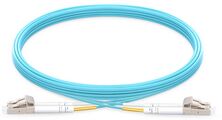 Multimode patch lead
 -
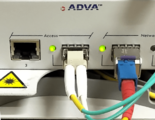 Close up
 -
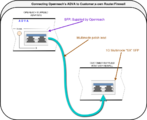 Patching in router using Singlemode


Can't use the RJ45 port...
- The Openreach NTE does have a copper RJ45 port as well as an SFP port for connection to the customer router - however, the copper port is disabled by Openreach and the fibre port should be used.
- If customer router only has RJ45 copper ports, then a little media convert would be required. These are available for under £20 - eg a TP-Link MC220L.
DAC cable?
- In most cases, it is possible to replace the Openreach supplied SFP with something different, eg a DAC cable, this may light an error LED on the Openreach box though, and so cause confusion in the event of a fault.
- We'd also require that the Openreach supplied SFP is used in the event of a fault report.
- We'd suggest just using multimopde fibre!
Power
- The ONT requires power, and has two IEC sockets for resilience.
- We suggest using normal mains power on the first socket and a UPS on the 2nd power socket.
100Mb/s Services (No longer offered)
For 100Mbit/s links the service is presented using a normal Ethernet (copper) RJ45 connector. You use a normal cat-5 Ethernet patch lead to connect this to your switch, router or firewall as you required.
IMPORTANT the port on the Openreach supplied unit is sometimes configured as fixed full duplex. This means that if it is connected to an un-managed switch or un-configured port on a switch, router or firewall then it will not work correctly. It will seem to work, but as soon as any reasonable level of traffic flows there will be dropped packets seriously hindering upload speeds. You must have a managed switch or port connected to the link and configure the port to be fixed full duplex 100Mbit/s for it to work correctly. We can supply a small managed switch for this purpose if you require.
Cabling is a straight through cat5e patch lead to your managed switch.
10Gb/s Services
For 10Gbit/s you will need special 10Gbit/s equipment, contact sales when ordering for details.
VLANs
At the customer side the service is presented on a VLAN. The VLAN ID will be discussed during the order process. This would then be set on your router as the VLAN on interface that is connected to the Openreach NTE.
The link you have can carry one or more service - the common one being for internet access. However the same link can have internet access and site-to-site access. These services can run at different speeds. All of the services will have a separate VLAN tag.
Where a dedicated site-to-site fibre is used then any packets simply go to the other end including any VLAN tags. This link is effectively a very long Ethernet cable, though still subject to packet size limits.
Packet size
Packet sizes up to 1548 are permitted on site-to-site traffic. Internet access is limited to 1500 bytes (plus VLAN tag where needed).
Technical details
See BT SIN 476 for technical details.
LED Status
PSU LEDs
There are two power supplies, PSU1 and PSU2
- Off - No power - check cabling, power, etc
- Red - PSU Failure - contact us
- Green - PSU OK
Network
This is the LED next to the socket for the lead-in fibre - the cable coming in from outside:
- Red - fault, or not connected
- Green - OK
Access
This is the LED next to the socket for your router
- Red - fault, or not connected
- Green - OK
For FSP150CP Units:

Critical
- off: normal, no alarms
- red: Indicative of a problem between the ADVA unit and the on site router (Check router has power and the cables connecting the two have not been disconnected, try rebooting, if problem persists
Major
- off: normal, no alarms
- on: Indicative of a problem with the access carrier, normally means the unit is not connected to the local exchange (Power cycle ADVA unit and carefully re-seat fibre into ADVA, if problem persists contact us
Minor
- off: normal, no alarms
- on: Minor problem exists, contact us.