
Email on iPad: Difference between revisions
Content deleted Content added
No edit summary |
No edit summary |
||
| Line 7: | Line 7: | ||
#Name, email and description are from the previous screen so no need to change. |
#Name, email and description are from the previous screen so no need to change. |
||
#'''Incoming Mail Server''' |
#'''Incoming Mail Server''' |
||
#Incoming mail server host name will be mail.yourdomainname.co.uk etc |
##Incoming mail server host name will be mail.yourdomainname.co.uk etc |
||
#Username is your email address and password for the account. |
##Username is your email address and password for the account. |
||
#'''Outgoing Mail Server''' |
#'''Outgoing Mail Server''' |
||
#Hostname will be the outgoing server that you want to use. You can use A&A's outgoing server if you have email with us or use our internet connection. If you wish to use your internet providers server they will need to supply you with the details. |
##Hostname will be the outgoing server that you want to use. You can use A&A's outgoing server if you have email with us or use our internet connection. If you wish to use your internet providers server they will need to supply you with the details. |
||
#Username will be your email address and password for this email address. |
##Username will be your email address and password for this email address. |
||
#Click Next[[image:Emailipad3.png|none|400px|thumb|Account Details Screen]] |
##Click Next[[image:Emailipad3.png|none|400px|thumb|Account Details Screen]] |
||
#Done. |
|||
Revision as of 13:34, 30 October 2012
- First of all you will need to go into settings, mail, contacts, calenders then click Add Mail Account.
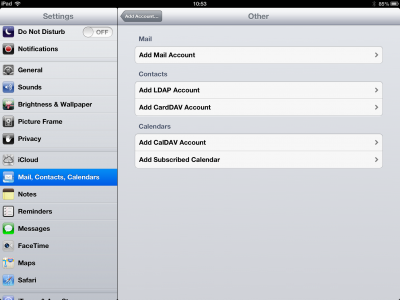
Settings screen - Now you will need to give the account a name. This can be anything you like.
- Email address of what account your setting up.
- The password for it and a description.
- Click Next
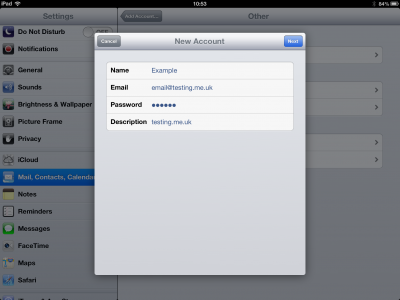
New Account screen - Now you choose if you would like to use Imap or Pop3.
- Name, email and description are from the previous screen so no need to change.
- Incoming Mail Server
- Incoming mail server host name will be mail.yourdomainname.co.uk etc
- Username is your email address and password for the account.
- Outgoing Mail Server
- Hostname will be the outgoing server that you want to use. You can use A&A's outgoing server if you have email with us or use our internet connection. If you wish to use your internet providers server they will need to supply you with the details.
- Username will be your email address and password for this email address.
- Click Next
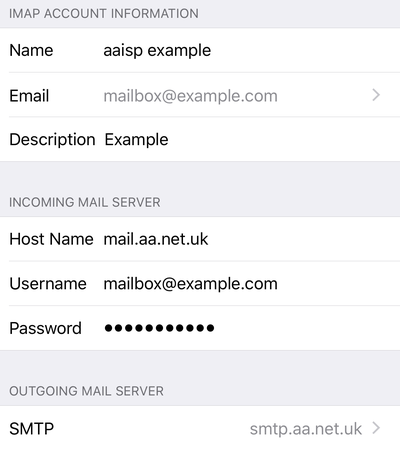
Account Details Screen
- Done.


