
Sieve Filtering: Difference between revisions

Thunderbird plugin no longer works, try sieve-connect |
Interaction between Spam checking and Sieve filtering |
||
| (9 intermediate revisions by the same user not shown) | |||
| Line 2: | Line 2: | ||
= What is Sieve filtering? = |
= What is Sieve filtering? = |
||
At a basic level, Sieve is a system whereby the server is given rules by you to filter your email into folders. It then means that, whatever email program you use, your email is already filed away in to their correct folder according to your needs. |
At a basic level, Sieve is a system whereby the server is given rules by you to process incoming email - e.g. forward emails, discard emails, or filter your email into folders. It then means that, whatever email program you use, your email is already filed away in to their correct folder according to your needs. |
||
It is helpful if you: |
It is helpful if you: |
||
| Line 10: | Line 10: | ||
*Read email from a number of devices |
*Read email from a number of devices |
||
This page explains how to connect |
This page explains how to connect to our sieve server using Roundcube or other ManageSieve client software, and gives some examples and also further about Sieve and the features we have enabled |
||
=Sieve Server Settings= |
=Sieve Server Settings= |
||
| Line 46: | Line 46: | ||
*Maximum number of actions = 128 |
*Maximum number of actions = 128 |
||
# Numbered list item |
|||
== Creating Sieve Filters == |
== Creating Sieve Filters == |
||
Our IMAP servers run 'ManageSieve', this is a service which clients talk to in order to create and edit sieve filters. ManageSieve runs on port 4190 on the IMAP servers. There are various clients which support ManageSieve, e.g.: |
Our IMAP servers run 'ManageSieve', this is a service which clients talk to in order to create and edit sieve filters. ManageSieve runs on port 4190 on the IMAP servers. There are various clients which support ManageSieve, e.g.: |
||
| ⚫ | |||
*RoundCube - our web |
|||
# Numbered list item |
|||
| ⚫ | |||
*[https://github.com/thsmi/sieve/releases Extension for Thunderbird] (fine for manually editing the script file) '''Important note:''' Use the latest version if the one from the Thunderbird is out of date. [https://github.com/thsmi/sieve/releases latest] version version 0.3 or higher should be ok. '''No longer works with Thunderbird versions dating from 2023'''. |
*[https://github.com/thsmi/sieve/releases Extension for Thunderbird] (fine for manually editing the script file) '''Important note:''' Use the latest version if the one from the Thunderbird is out of date. [https://github.com/thsmi/sieve/releases latest] version version 0.3 or higher should be ok. '''No longer works with Thunderbird versions dating from 2023'''. |
||
*[https://www.claws-mail.org/plugin.php?plugin=managesieve Extension for claws-mail] (may be packaged as claws-mail-managesieve). Very similar to the Thunderbird extension. |
*[https://www.claws-mail.org/plugin.php?plugin=managesieve Extension for claws-mail] (may be packaged as claws-mail-managesieve). Very similar to the Thunderbird extension. |
||
| Line 64: | Line 61: | ||
== Using Roundcube Filters == |
== Using Roundcube Filters == |
||
Roundcube will let you create filters using a WYSIWYG style editor - with easy to use drop-down options and so on. You can |
Roundcube will let you create filters using a WYSIWYG style editor - with easy to use drop-down options and so on. You can also edit the sieve code in 'raw' format - select 'Actions', 'Edit filter set' (it's the way to move rules up or down the order). |
||
To create a simple filter to move a few online shop emails in to a folder called shopping: |
To create a simple filter to move a few online shop emails in to a folder called shopping: |
||
| Line 80: | Line 77: | ||
=Other Sieve Notes= |
=Other Sieve Notes= |
||
*When using fileinto: with :create, a new folder will be created if it does not already exist, this is normal. In this case, the new folder will be subscribed to automatically. -You may need to restart your client (e.g. Thunderbird) for it to notice that there is a new folder that should be listed. |
*When using fileinto: with :create, a new folder will be created if it does not already exist, this is normal. In this case, the new folder will be subscribed to automatically. -You may need to restart your client, or collapse and reopen the folder list (e.g. Thunderbird), for it to notice that there is a new folder that should be listed. |
||
*spam folder: If you have a folder called spam then email which is marked as spam will end up there bypassing any |
*spam folder: If you have a folder called 'spam' then email which is marked as spam will end up there bypassing any Sieve filters. If you do not wish to happen then rename or delete the folder called 'spam', and add a filter to move spam marked messages to another folder (e.g. junk, rubbish, etc.) '''Update November 2023''': this appears not to be the case - the 'spam' folder is automatically created, but messages are processed by the spam engines, and then passed through Sieve filtering so you can decide what to do with the spam using your Sieve rules. To recreate the previous behaviour (and perhaps extend it a little) you might need a rule like: |
||
require ["fileinto","mailbox"]; |
|||
if exists "X-Spam-Flag" { |
|||
if header :is "X-Spam-Flag" "YES" { |
|||
if exists "X-Spam-Bar" { |
|||
# 20 OR MORE + |
|||
if header :contains "X-Spam-Bar" "++++++++++++++++++++" { |
|||
# Can't reject, not supported |
|||
fileinto :create "bad-spam"; |
|||
stop; |
|||
} |
|||
} |
|||
fileinto :create "spam"; |
|||
stop; |
|||
} |
|||
} |
|||
=Some Examples= |
=Some Examples= |
||
Latest revision as of 10:55, 18 December 2023
What is Sieve filtering?
At a basic level, Sieve is a system whereby the server is given rules by you to process incoming email - e.g. forward emails, discard emails, or filter your email into folders. It then means that, whatever email program you use, your email is already filed away in to their correct folder according to your needs.
It is helpful if you:
- Use IMAP
- Want to sort email into specific folders
- Read email from a number of devices
This page explains how to connect to our sieve server using Roundcube or other ManageSieve client software, and gives some examples and also further about Sieve and the features we have enabled
Sieve Server Settings
To setup and manage your Sieve filters you would use a program to connect to our 'Manage Sieve' servers. The easiest way to do this is to use our Roundcube webmail (see below). If you have your own manage sieve client then use the following settings:
| Sieve Server Connection Settings | ||
|---|---|---|
| Server | mail.aa.net.uk | Enable TLS |
| Port | 4190 | |
| Username | Your email address | e.g. fred@example.com. i.e., the same as what you use to collect email by IMAP |
| Password | your email password | i.e., the same as what you use to collect email by IMAP |
| Security | TLS | You should use TLS for a secure connection, required. |

Sieve file limits
- Maximum script size = 1M
- Maximum number of actions = 128
Creating Sieve Filters
Our IMAP servers run 'ManageSieve', this is a service which clients talk to in order to create and edit sieve filters. ManageSieve runs on port 4190 on the IMAP servers. There are various clients which support ManageSieve, e.g.:
- RoundCube - our webmail has a Filters option in the settings - We'd recommend this even if you don't usually use webmail.
- Extension for Thunderbird (fine for manually editing the script file) Important note: Use the latest version if the one from the Thunderbird is out of date. latest version version 0.3 or higher should be ok. No longer works with Thunderbird versions dating from 2023.
- Extension for claws-mail (may be packaged as claws-mail-managesieve). Very similar to the Thunderbird extension.
- On Linux, you may find a sieve-connect package which is a command line tool.
- There are others, take a look at sieve.info. You'd use the same server, username and password that you do to access your email, and use port 4190, and TLS.
Whatever IMAP email program you use the Sieve filtering will still work. It may be easiest to create and edit the filters using Roundcube webmail even if you don't wish to use Roundcube for reading email.
Using Roundcube Filters
Roundcube will let you create filters using a WYSIWYG style editor - with easy to use drop-down options and so on. You can also edit the sieve code in 'raw' format - select 'Actions', 'Edit filter set' (it's the way to move rules up or down the order).
To create a simple filter to move a few online shop emails in to a folder called shopping:
- First, create the Shopping folder (Settings-Folders, Click the Add button)
- go to Settings and Filters:
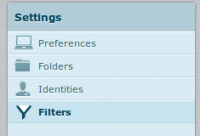
Settings - Filters - Create a new filter set, and then a new filter:
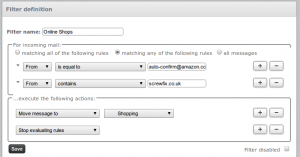
New filter


This will then move emails from these addresses in to a separate folder.
Sieve Extensions We Don't Support
We don't support the following extensions:
- reject
- This is because we don't want to have to deal with backscatter and emailing non delivery report messages
Other Sieve Notes
- When using fileinto: with :create, a new folder will be created if it does not already exist, this is normal. In this case, the new folder will be subscribed to automatically. -You may need to restart your client, or collapse and reopen the folder list (e.g. Thunderbird), for it to notice that there is a new folder that should be listed.
- spam folder: If you have a folder called 'spam' then email which is marked as spam will end up there bypassing any Sieve filters. If you do not wish to happen then rename or delete the folder called 'spam', and add a filter to move spam marked messages to another folder (e.g. junk, rubbish, etc.) Update November 2023: this appears not to be the case - the 'spam' folder is automatically created, but messages are processed by the spam engines, and then passed through Sieve filtering so you can decide what to do with the spam using your Sieve rules. To recreate the previous behaviour (and perhaps extend it a little) you might need a rule like:
require ["fileinto","mailbox"];
if exists "X-Spam-Flag" {
    if header :is "X-Spam-Flag" "YES" {
        if exists "X-Spam-Bar" {
            # 20 OR MORE +
            if header :contains "X-Spam-Bar" "++++++++++++++++++++" {
                # Can't reject, not supported
                fileinto :create "bad-spam";
                stop;
            }
        }
        fileinto :create "spam";
        stop;
    }
}
Some Examples
- Notify another mailbox when email arrives
- Move email to a folder
- Move email to a folder based on a localpart suffix
- HTML Autoresponder Automatically reply to incoming email with a HTML formatted email
Converting From Mozilla Thunderbird to Sieve
If you use Mozilla (e.g. Thunderbird) and have existing rules created, then they can be converted in to Sieve format on this 3rd party page: http://mozfilter2sieve.sourceforge.net/mailfilters.html. Here are some step by step instruction on moving the filters over:
- Open your msgFilterRules.dat file in a text editor (notepad, gedit etc.)
- This file will be found in your 'Local directory', which can be found in Account Settings - Server Setting - look for the 'Local directory' box at the bottom.
- Copy and paste the text in to the converter
- Install the ThunderBird ManageSieve Addon:
- Tools - Addons - Search for Sieve, and Install 'Sieve'
- Go to Tools - Sieve Message Filters
- Click 'New...'
- give it a name, e.g. My Filters
- Paste in the results from the converter page
- Check that there are not any errors reported, then click Save.
- Close the tab with the script, and you'll be returned to the SieveFilters tab
- Click the little Active button so that it turns in to a green tick.
- Close that tab
- Disable the original Thunderbird filters:
- Either by closing Thunderbird and renaming the msgFilterRules.dat to something else (e.g. msgFilterRules.dat.old) or by unticking all the tick boxes under Tools - Message Filters.
- By default Thunderbird only checks the Inbox for new email, now that email will appear in different folders, we need to tell Thunderbird to check each folder:
- Preferences - Advanced - General - Config Editor (be careful!)
- Search for: mail.server.default.check_all_folders_for_new
- Set the Value to True by double clicking on it
- Close the windows
- You can then view the filters via Roundcube webmail, which is easier to edit as it's more of a GUI editor rather than than a straight script editor like the Thuinderbird addon is.