
Stopping Open DNS - ZyXEL P660R-D1: Difference between revisions
No edit summary |
No edit summary |
||
| Line 1: | Line 1: | ||
[[File:P660rd1.png|link=Router - ZyXEL P660R-D1]] |
[[File:P660rd1.png|link=Router - ZyXEL P660R-D1]] |
||
The factory setting for this router is for DNS to be open on the WAN. This will be changed when configured by AAISP, but if it is configured from new, or reset, then WAN side DNS |
The factory setting for this router on older firmware is for DNS to be open on the WAN. This will be changed when configured by AAISP, but if it is configured from new, or reset, then WAN side DNS may need to be disabled. This can be done from the web interface and '''setting DNS Access Status to LAN'''. Go to: |
||
> Advanced - Remote MGMT - DNS - LAN |
> Advanced - Remote MGMT - DNS - LAN |
||
Revision as of 09:24, 27 June 2013
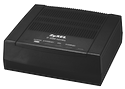
The factory setting for this router on older firmware is for DNS to be open on the WAN. This will be changed when configured by AAISP, but if it is configured from new, or reset, then WAN side DNS may need to be disabled. This can be done from the web interface and setting DNS Access Status to LAN. Go to:
> Advanced - Remote MGMT - DNS - LAN

What is the IP address of the router?
Most routers supplied by AAISP will have a sticker or card on the base of the router which will have the IP address.
What is the admin username and password
Most routers supplied by AAISP will have a sticker or card on the base of the router which will have the password. On the ZyXEL the username is admin.
Unable to get to the web interface?
If you are unable to get to the web interface, then try turning the router off and on again.
Changing this via Telnet
If you still can't access the router web pages, then you can do this via telnet by running the following commands:
sys server load
sys server access dns 2
sys save
This also applies to the P-660HW-T1 v2 Router